

Once your baby is asleep, you may finally have a few quiet minutes to yourself. But even when you leave the nursery, you may still want to know that your baby is sleeping comfortably.
A baby monitor lets you check in without staying beside the crib. Features such as clear video, night vision, VOX alerts, two-way audio, long battery life, and split-screen viewing can make everyday monitoring easier.
For families who prefer not to rely on home internet, a non-Wi-Fi baby monitor provides a direct connection between the camera and parent unit. So, which features actually matter most for your family?
What Is a Non-Wi-Fi Baby Monitor?
A non-Wi-Fi baby monitor uses a camera in your baby's room and a parent unit you keep nearby. The camera sends live video and audio directly to the parent screen. It does not require your home Wi-Fi or a smartphone app.
Many models use 2.4GHz FHSS, which stands for Frequency Hopping Spread Spectrum. This wireless technology switches between frequencies in the 2.4GHz band to keep a local connection. It also helps reduce some types of interference.
In everyday use, the advantage is straightforward: you can monitor your baby without an internet connection, launching an app, or keeping your phone nearby. The dedicated parent unit is ready whenever you want to check on your baby's sleep.
A non-Wi-Fi monitor also has a different privacy profile from an internet-connected camera. Local video transmission avoids many connected-camera risks, but no wireless system is completely immune to interception.
Baby Monitor Features to Consider
Once you know that you want a non-Wi-Fi monitor, the next step is to think about how you will use it. The most useful features are not always the ones with the longest specifications list. They are the ones that make ordinary parenting moments feel a little easier.
Range:
Think about where you usually spend time while your baby is sleeping. You may be in the kitchen, working in another room, folding laundry upstairs, or sitting outside for a few minutes. A reliable range allows you to keep the parent unit with you instead of staying close to the nursery.
The right range depends on your home's layout. Walls, floors, building materials, and other wireless devices can affect the actual signal. Manufacturer range claims are often measured in open areas, so consider the distance between the nursery and the places where you normally use the monitor.
Battery Life:
Battery life becomes especially important when you use a monitor throughout naps and overnight. Look at the parent unit's battery capacity and expected runtime in both normal viewing and power-saving modes.
Runtime can change depending on screen brightness, video resolution, connection distance, and whether the display stays on continuously. Features such as VOX can help conserve power by keeping the screen off until the monitor detects sound.
Video Quality and Screen Size:
A clear video feed lets you check your baby without immediately walking into the nursery. HD video is a useful starting point, while a 1080p camera can provide additional detail when you want to see small movements or expressions.
Screen size matters, too. A larger parent display can be easier to view from across the room, especially during nighttime checks when you want to see your baby without fully waking yourself up.
Night Vision:
Much of baby monitoring happens when the lights are off, making dependable night vision an important feature. Infrared night vision allows the camera to show your baby in a dark nursery without turning on a light and disturbing their sleep.
This can be particularly useful when you hear your baby cry in their sleep. Babies can make noises, move, or briefly cry during sleep without fully waking. Being able to see what is happening first can help you decide whether your baby needs attention or is simply moving through a normal sleep pattern.
Understanding these moments can also be useful for parents who are learning about active sleep and the transition between sleep cycles. A monitor does not replace your judgment, but it can give you more information before you decide whether to enter the room.
Multiple Cameras and Split-Screen Viewing:
One camera might work fine for one nursery, but what you need can shift as your household expands. If you have twins, multiple children, or kids who regularly nap, sleep, or play in different rooms, you may prefer a monitor designed to handle more than one camera.
With split-screen viewing, you can watch multiple camera feeds on a single parent unit. Certain models also include picture-in-picture or rotating scan options, so you can monitor several areas without hauling extra displays from room to room.
When shopping for the best split screen baby monitor no wifi, don’t stop at the words “split screen.” Confirm the maximum number of supported cameras. Find out whether audio stays on a selected camera or alternates between feeds. Make sure the screen is big enough for clear, usable views.
VOX and Two-Way Audio:
You do not need to stare at a video monitor for the entire time your baby sleeps. VOX, or voice-activated mode, can keep the screen off until the camera detects sound. Depending on the model, the parent unit may then wake the screen or send an audio alert.
Two-way audio is useful when your baby needs to hear your voice before you enter the room. A gentle “I'm right here” may be enough to settle a small fuss, while other situations may call for a closer check.
What Matters Most to You?
Every family uses a baby monitor differently. Rather than looking for a model with every possible feature, start with the part of daily life you most want to make easier.
| What Matters Most to You? | What to Look For | Monitor Type to Consider |
|---|---|---|
| I want to see my baby clearly. | Large parent display, HD or 1080p video, infrared night vision and digital zoom | High-resolution non-Wi-Fi video monitor |
| I want more freedom around the house | Long battery life, VOX, dependable range and a portable parent unit. | Long-battery non-Wi-Fi monitor |
| I need to watch more than one space. | Multiple-camera support, split-screen viewing, camera expansion and pan/tilt control. | Multi-camera split-screen monitor |
| I want a simple setup. | Direct local connection, 2.4GHz FHSS and a dedicated parent screen. | 1. Baby monitor no WiFi |
| I want easier nighttime checks. | Clear night vision, sound alerts, VOX and two-way audio. | 2. Night-focused video monitor |
Popular Non-Wi-Fi Baby Monitor Features Compared
When comparing popular models, focus on the specifications that affect your daily routine. The following examples show how different non-Wi-Fi monitors may approach screen size, video quality, camera support and convenience features.
| Monitor | Connection | Display and Video | Camera Support | Key Features |
|---|---|---|---|---|
 Comfyer BM01 Comfyer BM01 |
2.4GHz FHSS, non-Wi-Fi | 7-inch parent display, 1080p camera | Up to 4 cameras | Split-screen viewing, 4x digital zoom, 355° pan, 120° tilt, VOX and temperature alerts |
 Babysense MVPRO Babysense MVPRO
|
Non-Wi-Fi local connection | 5.5-inch Full HD display | Multiple cameras with split-screen support | Pan/tilt control, night vision and power-saving mode |
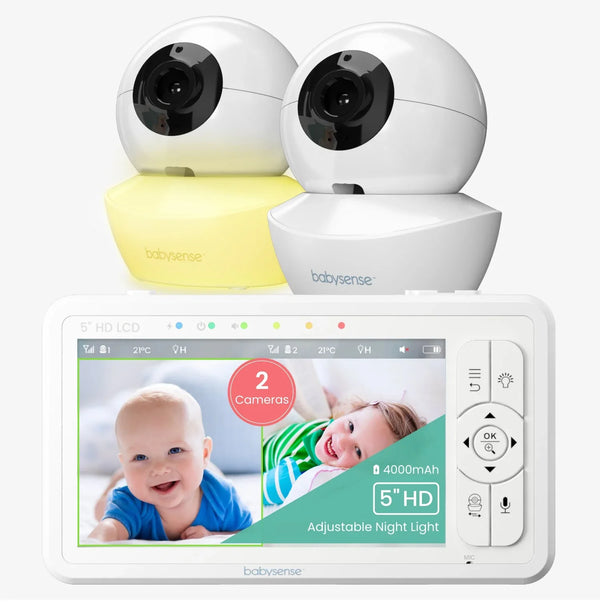 Babysense HD S2 Babysense HD S2
|
2.4GHz FHSS, non-Wi-Fi | 5-inch 720p display | Up to 4 cameras | Split-screen viewing, pan/tilt, zoom, night vision and ECO mode |
 HelloBaby HB6550 family HelloBaby HB6550 family
|
Non-Wi-Fi connection on applicable models | Model-dependent | Model-dependent | Night vision, two-way audio, temperature monitoring and pan/tilt functions |
Product specifications may vary between individual models, bundles and camera configurations. Always check the exact product version, especially when comparing battery life, camera quantity and split-screen functions.
Are There Any Downsides to a Non-Wi-Fi Baby Monitor?
A non-Wi-Fi monitor is designed primarily for use inside the home. Its main limitation is that the parent unit generally needs to remain within the monitor's transmission range.
If you want to check on your baby while you are at work, traveling, or away from home, a Wi-Fi monitor with smartphone access may be more suitable. A non-Wi-Fi monitor generally cannot send live video to your phone when you are somewhere else.
Indoor range can also be affected by your home's layout. A monitor that works well in an open room may perform differently across several floors or through thick walls.
Camera placement is another practical consideration. Depending on the design, some monitors can be placed on furniture, while others may support a wall mounted setup or flexible positioning. Choose a locati0n that provides a clear view while keeping cables and accessories safely out of your baby's reach.
Finally, a baby monitor is a tool for awareness and convenience. It does not replace safe sleep practices or the need to check on your baby directly when something concerns you.
Non-Wi-Fi Baby Monitor Buying Checklist
Before choosing your monitor, make sure it covers the features that matter most to your family:
- Can I see my baby clearly?
- Will I be able to see my baby at night?
- Will the battery last through naps and overnight?
- Will the monitor work throughout my home?
- Can I monitor more than one space?
- Can I hear my baby without watching the screen constantly?
- Do I want a monitor without Wi-Fi?
- Which extra features would actually help my routine?
Final Thoughts
Choosing a baby monitor is ultimately about finding the right balance between visibility, convenience, privacy, and the way your family lives day to day.
A non-Wi-Fi baby monitor can be a practical choice if you want a dedicated screen and a local connection without relying on home internet. The features that matter most may be different for every family—from a larger display and dependable night vision to long battery life, VOX alerts, or split-screen viewing.
Whether you are checking on your baby's sleep, listening for a small sound, or deciding whether that cry needs your attention, the goal is not to watch the monitor constantly. It is to have a reliable way to check in when you need to.
Looking for a non-Wi-Fi monitor with a large screen, multi-camera viewing and long battery life?


